WebSentry
Spots phishing sites and explains the risk in plain English.
- Type
- University project
- When
- 2026
- My role
- Solo developer, final year project
Tools: Spring Boot, Python, XGBoost, React, FastAPI, MongoDB, Claude API, Chrome extension
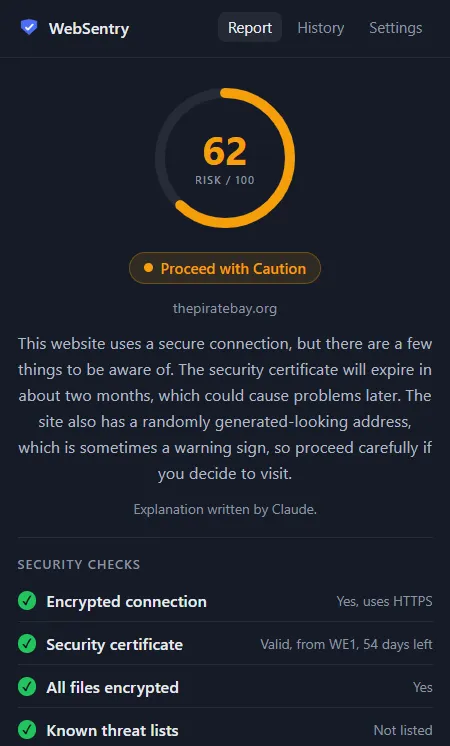
Problem
Most people cannot tell a fake login page from a real one. Browsers warn only about sites that are already on a list, and security tools explain risks in technical language that everyday users don’t understand.
WebSentry checks every website a person visits and gives them a simple report: a risk score from 0 to 100, a plain-English explanation, and one clear recommendation: Stay Safe, Proceed with Caution or Leave Immediately.
My role
This was my individual final year project for a BSc (Hons) in Software Engineering. I built the whole system alone:
- the planning, the UI design in Figma, and four design diagrams
- the browser extension, the backend, the machine-learning service and the admin dashboard
- the tests, the evaluation and the documentation
How I built it
The system has five parts that work together.
- Browser extension (Manifest V3). It scans each page in the background and shows a coloured badge and a popup report. It also shows a full-page warning for dangerous sites, warns before you type a password on a risky page, and checks the links on a page.
- Spring Boot backend. A six-step scan pipeline: Google Safe Browsing lookup, rule checks, the ML score, combining the scores, the AI explanation, and saving the record. The scoring engine sits behind an interface, so it can be swapped through configuration.
- Rule engine. It checks HTTPS, certificate validity, mixed content, IP addresses used as hosts, brand impersonation, abused domain endings, look-alike letters (punycode) and the “@” trick in addresses.
- Machine-learning service (Python, FastAPI). I compared three models (Random Forest, XGBoost, and a hybrid of character n-grams and lexical features) and chose the hybrid.
- Claude API. It writes the plain-English explanation. A built-in template takes over if the API fails.
- React dashboard and MongoDB Atlas. Statistics, all scans, the most-flagged websites, model metrics and CSV export.
Challenges
The model was “cheating”
My first model scored 99.5% accuracy, which was too good to be true. It even flagged a normal Google search link. In the dataset, every safe URL was a bare homepage and every phishing URL was a full address, and the model had simply learned that pattern. I limited the model to the hostname, and moved the HTTPS and certificate checks into the live rule engine, where they belong.
Big brands were scored as dangerous
The dataset labelled phishing pages hosted on services like Google Docs as phishing, so the model learned that big brands were risky: amazon.co.uk scored 91, “Leave Immediately”. I removed phishing rows whose full hostname is a top-ranked legitimate domain, and added about 99,771 popular domains to the safe class. Phishing on legitimate platforms is left to Google Safe Browsing, and I documented this as a limitation.
The explanation contradicted the score
Some explanations said a site looked fine while its score was high. I changed the logic so a risk factor is only mentioned when a check really found it, and added 7 tests that make sure an explanation never contradicts its score.
Fast scoring with a slow AI
A fresh Claude explanation takes 1 to 2 seconds, but the badge has to appear straight away. I separated the score from the explanation and cached the explanations.
The demo must not fail
The system depends on four outside services. I gave each one a fallback (a template instead of Claude, in-memory storage instead of MongoDB, and rules-only scoring if the ML service is down) and wrote tests for each failure mode.
Result
- 88.75% accuracy and 98.74% precision on a frozen 400-URL test set (200 phishing, 200 legitimate), beating the 85% target. Only 2 false positives out of 200 legitimate sites.
- The test set is locked with a SHA-256 checksum. The evaluation script refuses to run if the data changes, so the result always refers to the same data.
- All 400 evaluation scans finished, with 0 failures.
- Scoring takes 13 ms on average, and a repeat visit takes under 20 ms.
- 45 automated backend tests, including tests against a real embedded MongoDB and a stand-in Safe Browsing server.